
The plugins handle the chores. You hold the final pencil.
Built YOUR Plugins to Do the Boring Parts of Affiliate Marketing
Most affiliate sites run on a handful of chores that come back every week. You write meta descriptions, turn a finished review into social blurbs and a video description, check that every post carries its disclosure line, and tidy product details into a comparison table. None of it is hard, which is the problem. Hard work at least feels like progress, while this stuff just eats Tuesday.
A custom plugin can help with exactly that kind of work. Give it a clear job, reliable reference material and a few rules about what to do when something is missing. Then test whether it follows them before handing over your Tuesday.
The weekly tasks worth handing off
Before you build anything, write down what you repeat. Keep a plain list for one week and add a line each time you catch yourself doing something you have done many times before. For an affiliate site, that might include:
- Meta titles and descriptions for new posts.
- Social and email blurbs repurposed from a finished article.
- Video descriptions and chapter drafts from a script.
- Pre-publish checks: disclosure present, links labeled, headings in order.
- Comparison tables drafted from a supplied product sheet.
Start where the input and output have a reasonably stable shape. An article goes in; three meta descriptions come out. Choosing which product deserves your audience’s money involves rather more judgment.
Pick one or two chores first. There is no prize for building an entire marketing department before lunch.
What a plugin actually brings to the job
A ChatGPT plugin can package reusable instructions, reference material and tools for a particular workflow. Its skills guide how the work should happen; connected tools can provide access to information or supported actions in other services. Some plugins contain only skills and need no external connection. ChatGPT Learn
For this article, we are talking about plugins used inside ChatGPT. A plugin installed in WordPress is a separate thing. Giving your ChatGPT plugin a splendid name does not install anything on your website.
Think of a small collection of specialist pencils. One prepares snippets. Another formats articles. Another checks a supplied draft against your publishing checklist. You still decide what gets written and what reaches the reader.
The plugin’s instructions help shape the work, but AI still produces the response. A neatly packaged workflow can produce a neatly packaged mistake.
Build the smallest useful version
Where Plugin Creator is available to your account, start a conversation, select it with an @ mention and describe the recurring task. Supply an example, explain the required output and say how missing information should be handled. Review the finished instructions and reference material before relying on the result. Access depends on your account and workspace settings. ChatGPT Learn
For a first version, choose a task that works with text you paste or a file you supply. Drafting meta descriptions does not require a connection to your website. Add connections when the workflow actually needs them.
You can begin with a brief like this:
Create a plugin for drafting meta descriptions from articles I provide. Return three numbered options, each no longer than 155 characters, including spaces. Preserve the article’s meaning and tone. Do not introduce claims, prices or benefits absent from the article. Avoid “unlock,” “game-changing” and “ultimate.” Return only the three options.
That gives you something concrete to test. “Help me with marketing” gives you a cheerful colleague with no job description.
Write instructions it can follow
Good instructions cover five things:
- The job: “Draft meta descriptions for an affiliate blog.”
- The input: A finished article, product sheet or video script.
- The output: Number of options, length and layout.
- The style: Tone, words to avoid and examples worth following.
- Missing information: What to do when the source does not contain an answer.
That last point deserves its own chair at the table. Try: “If the supplied source does not state a price, feature or commission rate, do not supply one. Write MISSING instead.”
A rule like that gives the AI something useful to do besides guess.
Keep each workflow focused. You can have several related skills within a plugin, but make their jobs and rules distinct. A meta description should not acquire an email greeting because both tasks happen to live in the same package.
Where it breaks first
Expect the first run to be mediocre in predictable ways. It may ignore your character limit, use “unlock” in every other line or add a cheerful closing sentence you never requested.
Make the correction specific and update the reusable instructions. A correction made in one conversation is not proof that the plugin’s saved instructions have changed.
Keep three or four familiar test inputs and reuse them after edits. Include an ordinary article, a thin product sheet and something with an important detail missing. Otherwise, you fix one problem and quietly invite another in through the kitchen.
For anything measurable, measure it. If the description must stay under 155 characters, check the count. Asking AI whether it followed its own rule is a useful question, but an ambitious quality-control department.
Give it your content and current offers
Useful reference material for an affiliate workflow includes:
- A style sheet: Your voice, words you avoid and a few real paragraphs from your posts.
- An offers sheet: Exact product names, supported claims, restrictions and the date the details were checked.
- A link and disclosure sheet: Your standard wording and link-labeling conventions.
Keep these short and clearly labeled. Separate topics so you can update product information without digging through three pages about your preferred use of commas.
Make the current version unmistakable. If an old offers sheet remains available beside a new one, you have given the workflow two competing answers.
Add a source rule such as:
Use the current offers sheet as the only source for product details. If a detail is absent, mark it MISSING. If sources disagree, flag the conflict. Do not choose an answer silently.
Then ask about a product you never supplied. An impressive answer is precisely what you are hoping not to receive.
Connections need a separate job description
A plugin working from pasted text has a straightforward boundary: it can work with what you supplied. A connected plugin may also retrieve information or perform supported actions, depending on the tools and permissions available.
OpenAI’s documentation distinguishes workflow instructions from the apps that supply information and actions. Adding an app does not grant extra access; the connection and source service’s permissions still apply. ChatGPT Learn
Describe what you want that connection to do. “Read this product sheet and draft a comparison table” is clear. “Manage my site” leaves rather a lot of room between fetching a paragraph and replacing your homepage.
For publishing work, a useful instruction is: “Prepare the draft, show the proposed changes and wait for my approval before publishing.” If a tool cannot perform the requested action, the workflow should say so and return something you can use manually.
A plugin’s name is not evidence of its capabilities. “Website Wizard” may still need you to paste the article.
The moment it confidently makes things up
Sooner or later, an AI-assisted workflow may state something false in the same calm tone it uses for everything true. On an affiliate site, familiar examples include:
- A price or discount that does not exist.
- A feature borrowed from a competing product.
- An unsupported commission rate or cookie duration.
- A review “quote” that nobody wrote.
A plugin does not remove that possibility. Instructions and sources help, but a plausible sentence can still slip through. Readers who act on a made-up price will blame you, and reasonably so. Your name is on the page.
Four habits help keep this under control:
- Flag gaps. Require MISSING where the source lacks an answer, then search drafts for it before publishing.
- Ask for traceable sources. Have factual claims point to a file and heading or an accessible source page. Check that the source supports the claim.
- Test awkward cases. Ask about absent products, missing prices and conflicting documents.
- Verify changing details. Check prices, offers and program terms against their original sources before publication.
A source label is useful only if it leads somewhere real. AI can invent a convincing reference as comfortably as a convincing discount.
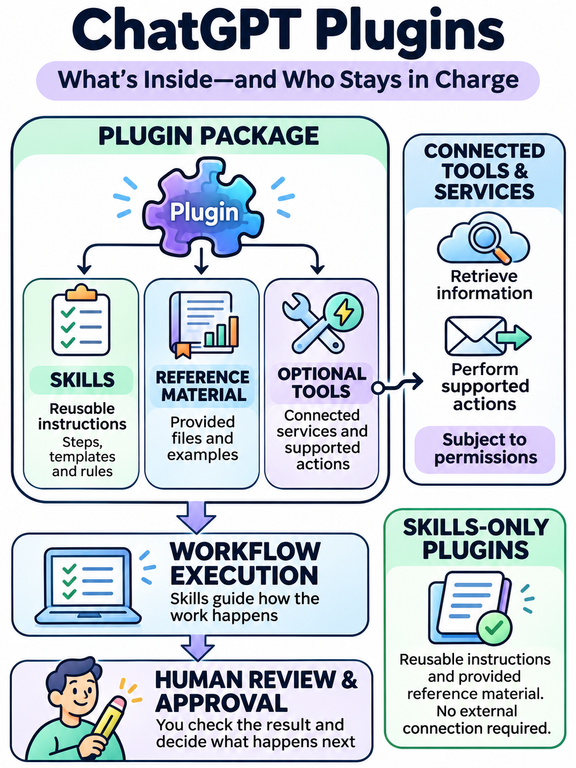
What belongs in the workflow—and what stays with us
A well-designed plugin can help with tasks that have clear inputs, a defined output and reliable source material nearby:
- Draft titles and descriptions within your chosen limits.
- Turn a finished article into social posts and an email blurb.
- Prepare video descriptions and suggested chapters from a script.
- Check supplied content against a publishing checklist.
- Lay out comparison tables from verified product details.
Keep the scope of each check honest. A plugin can flag that a supplied draft lacks your disclosure wording. It cannot confirm what appears on the live page unless it can actually inspect that page. Suggested video chapters also need checking against the finished video; a script alone does not establish exact timestamps.
Some work stays with us because it is the reason readers came:
Choose what to promote. AI can organize evidence and compare options. We decide what deserves our recommendation.
Firsthand experience. If we have used the product, those observations are ours. Instructions should preserve that experience without manufacturing more of it.
The final fact check. Someone still checks that claims and sources agree.
Editorial judgment. A style sheet can capture preferences. It cannot make every decision about what matters, what feels fair or what should be left unsaid.
A useful test is to ask what happens if the workflow gets something wrong and nobody notices. A dull meta description is an editing problem. An invented product claim can mislead a reader. The consequences tell you where closer review belongs.
Give it one boring job first
Build one small plugin for one recurring task. Use it for a few weeks, keep examples of its mistakes and refine the instructions when a pattern appears. Add the next workflow when the first one earns its place.
The aim is to stop spending Tuesday explaining the same chore, while keeping enough attention for the work that carries your name.

If you want hosting, community and a place to turn these experiments into part of your affiliate business, come and explore Wealthy Affiliate with us. Bring your weirdest automation ideas. Give the first one a very small job.
Thank you for your visit! Give WA a TRY!
Source and Image OpenAI’s ChatGPT Language Model
Related Posts