

Everyone Recommends a Different Host and Your Wallet Is Tired
Hosting and cost confusion
You need a plan that keeps your site online, a domain name, a security padlock in the browser bar, backups and support that answers when something breaks. Everything else on the pricing page can wait until your site gives you a reason to want it.
That sounds simple until you open three tabs, read five recommendations and discover that each host has a “most popular” plan, and it is never the cheapest one. This guide gives you a way to sort every feature into one of three buckets so you can decide in an afternoon instead of a fortnight.
Why does every host sound like the right answer?
Because every recommendation is sincere and none of them is about you. The friend with a busy online shop picked a host for heavy traffic. The blogger who found a launch deal picked the deal. The video creator with huge files picked storage. Each person is telling you what worked for their site.
Then there is the pricing page, which is designed to make each feature sound like insurance. “Advanced malware protection” and “priority performance” are phrases built to make you feel that skipping them is irresponsible. Add the fear of choosing wrong and moving your whole site later, and you get a very tired wallet.
A site with no visitors has very different needs from a site with ten thousand a month. Most of the confusion comes from mixing those two situations together.
What do you actually need on day one?
Day one is the day you publish your first post and share it with a handful of people. The list of things that must work is short.
- A plan that hosts your site. Any entry level plan from a known host does this. You do not need the middle tier to publish a blog.
- A domain name. This is the address people type. Check whether it is included in the first year and what it costs to keep afterward.
- The padlock. This is the security certificate that gives your site https instead of a browser warning. Many plans include it at no extra charge, so paying separately for it deserves a raised eyebrow.
- Backups you can restore. If you break your site at 11pm, you want to roll back with a few clicks. Find out whether backups are automatic and how far back they go.
- Support you can reach. Look at how you contact them (chat, ticket, phone) and whether a human replies. You will want this most on the day you know the least.
- A renewal price you can live with. The price you pay in month one and the price you pay at renewal can be different. Only the second number is your real cost.
If a feature is not on this list, it needs a reason to be on your bill. That is the whole method, and the rest of this guide applies it.
Which extras are upsells you can park for later?
Use three labels. Need now means the site breaks, is unsafe or loses data without it. Maybe later means it improves something you already have once real visitors show up. Skip for now means it solves a problem you cannot yet name.
Here is how common plan features tend to sort for a new site. Your situation may shift a line or two, so treat this as a starting point.
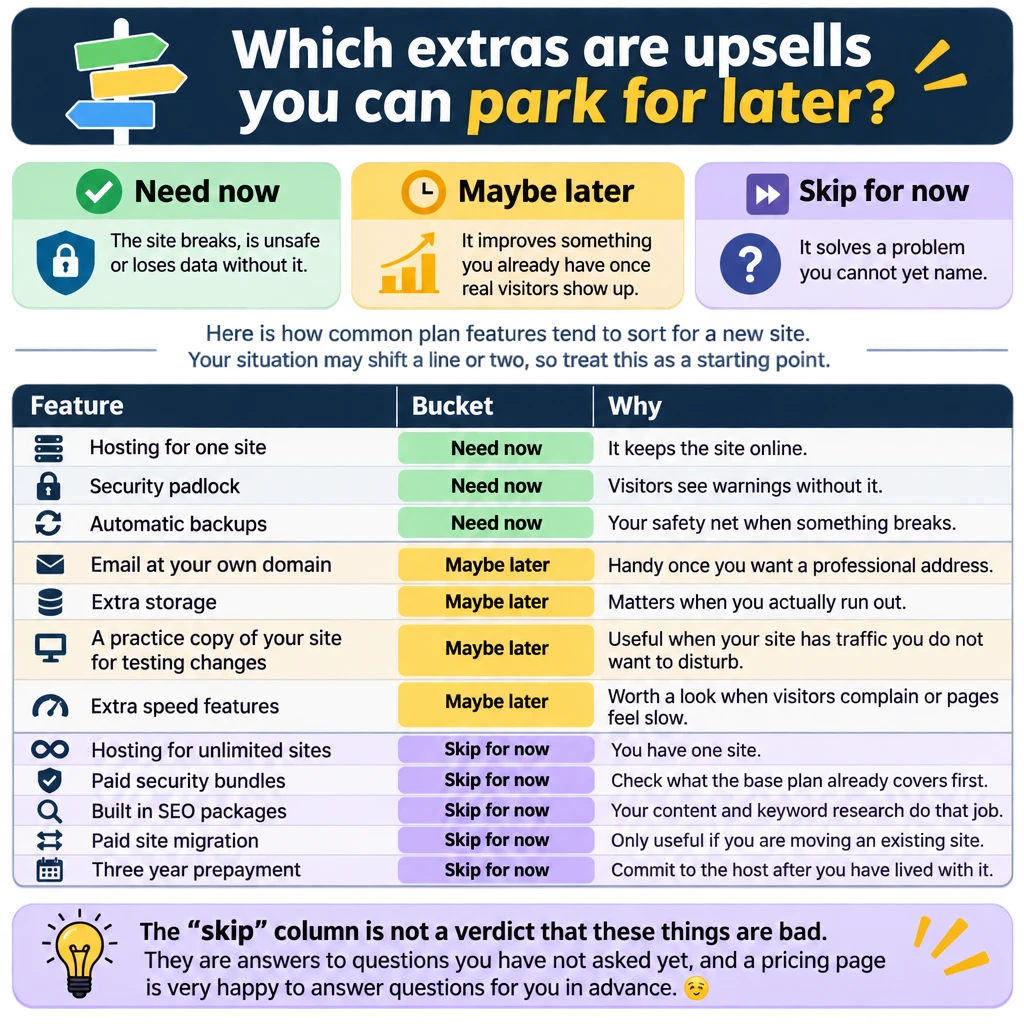
The “skip” column is not a verdict that these things are bad. They are answers to questions you have not asked yet, and a pricing page is very happy to answer questions for you in advance. 😏
How do you read a pricing page without losing a weekend?
Set a timer for 45 minutes and work through the page in this order.
- Find the renewal price first. It is often in small print near the bottom or inside the checkout. Write down both the starting price and the renewal price for the plan you are considering.
- Read what the cheapest plan includes. Compare that list with your day one needs. If it covers them, you have found your plan and the tiers above it are for later.
- Check the billing term. The lowest advertised monthly price often needs a longer commitment. Decide whether you want to pay for that much time on a host you have not used yet.
- Watch the checkout for pre-ticked boxes. Extras like privacy services, security add-ons and site builders can be switched on before you reach the payment button. Untick what you did not choose on purpose.
- Look up the refund or cancellation terms. You are not planning to leave, but you should know how easy it would be.
When the timer rings, pick the plan that passes steps one and two. If two hosts both pass, choose the one whose support you would rather talk to. Your site will not care which one you picked, and neither will your first ten visitors.
Who should you trust when advice disagrees?
Trust the advice that comes with a reason and a context. “Use this host” tells you nothing. “Use this host because my blog has about 50 posts, uses a lot of images and needed faster pages” tells you whether that person’s situation looks like yours.
Ask three questions of any recommendation.
- Does this person have a site like mine? A recommendation from a store owner for a hobby blog is probably more plan than you need.
- Do they earn money if I sign up? Many recommenders do, affiliates included. That does not make the advice wrong. It does mean you should ask for the reason as well as the name.
- Did they name any downsides? Every host has some. A recommendation with no drawbacks is an advert.
When two trustworthy people disagree, you are usually looking at two good options. Run both through the three buckets, and the difference often turns out to be a feature you have filed under “maybe later”.
When does an upgrade make sense?
An upgrade makes sense when your site hands you a specific reason. Four reasons are good enough.
- You hit a limit the plan states. Storage or visitor allowances run out, and your host tells you so.
- Pages load slowly for real visitors. Test a few pages first, because slow can also mean oversized images, and that costs nothing to fix.
- You need a feature you can name. For example, an email address at your domain because you are now contacting brands, or a test copy of the site because you are about to change your design.
- Support cannot solve a recurring problem on your current plan. Check whether a higher tier genuinely changes that before you pay for it.
“The pricing page said I should” and “it felt like the grown-up plan” do not count. Upgrading takes a few minutes when you need it. Downgrading after you have prepaid for years takes a lot more patience.

What should you do this week?
Keep it small. This is a list for one sitting plus a short follow up.
- Write your day one list on a sheet of paper. Use the six items above and add anything unique to your site.
- Pick no more than three hosts to compare. A fourth tab adds confusion and almost never adds a better option.
- Find the renewal price for each plan and write it next to the starting price.
- Sort every extra you meet into need now, maybe later or skip for now. Do it as you read, not afterwards.
- Choose the cheapest plan that covers your day one list, and set a calendar reminder for three months from now to check whether any “maybe later” item has become a “need now”.
If a term trips you up along the way, my hosting basics post covers the fundamentals in more detail.
Your first host is not a lifetime marriage. It is a place to publish while you find out what your site actually needs, and that information only arrives once you have content and visitors.