
WordPress, Are You Ghosting Me
WordPress, Are You Ghosting Me, A funny (but actually useful) guide to 2 “Critical Errors”: causes + solutions
You open Tools → Site Health expecting a calm little green checkmark.
WordPress opens a trapdoor, tosses you into a dungeon, and yells:
“2 critical errors.”
Cool. Love that for us.
Today’s villains:
- The REST API encountered an error
- Your site could not complete a loopback request
And both are throwing the same tantrum:
cURL error 28: Connection timed out after 10000 milliseconds
Translation: “I tried to talk to your site/server. It stared into the void for 10 seconds. Then it gave up.”
Let’s break them down—what they mean, why they happen, and how to fix them—with minimal crying.
Critical Error #1: “The REST API encountered an error”
What it is (in human terms)
The REST API is WordPress’ messenger pigeon system. It’s how WordPress talks to itself and to other apps.
The block editor (Gutenberg) uses it constantly to:
- load editor data
- autosave
- publish updates
- fetch post types and settings
Your specific error says WordPress tried to call:
https:// mysite.com/wp-json/wp/v2/types/post?context=edit
…and got:
(http_request_failed) cURL error 28: Connection timed out after 10000 milliseconds
So WordPress knocked on its own door and nobody answered in time.
Common causes
Here are the usual suspects:
- Server is slow or overloaded
High CPU/RAM usage, too many processes, not enough resources. - Firewall/WAF blocks “internal” requests
Security plugins, hosting firewalls (ModSecurity), Cloudflare rules, etc. may treat REST requests as suspicious. - REST API is disabled or restricted
Some security plugins or snippets block /wp-json/ or restrict access for logged-out users (sometimes too aggressively). - DNS / IPv6 / networking weirdness
Server tries to resolve your domain to an unreachable IP, or prefers IPv6 but the path is broken. - cURL / SSL issues
Less likely here because it’s a timeout (not an SSL handshake error), but still possible if SSL verification stalls.
Fixes (do these in order)
1) Check if REST API is reachable from the outside
Open in a browser (or incognito):
- https:// mysite.com/wp-json/
- https:// mysite.com/wp-json/wp/v2/types/post?context=edit
If it’s slow, blank, or 403/timeout → you’ve confirmed it’s not just WordPress being dramatic.
2) Temporarily disable security plugins (or their “hardening”)
Common culprits: Wordfence, iThemes, All-In-One Security, Sucuri, etc.
Look for settings like:
- “Disable REST API”
- “Block JSON endpoints”
- “Prevent access to wp-json”
3) Check Cloudflare / WAF / ModSecurity logs
If you’re behind Cloudflare:
- Try temporarily setting to “Development Mode”
- Review Firewall events for blocks on /wp-json/
If your host uses ModSecurity, ask support to check whether requests to /wp-json/ are being blocked or rate-limited.
4) Increase server resources / optimize performance
Because: timeouts are often just performance wearing a fake mustache.
Quick wins:
- Enable full-page caching (host cache / plugin cache)
- Add object caching (Redis/Memcached if available)
- Reduce heavy plugins
- Update PHP version (if you’re on something old)
- Turn on OPcache (usually enabled by hosts)
5) Fix DNS resolution issues
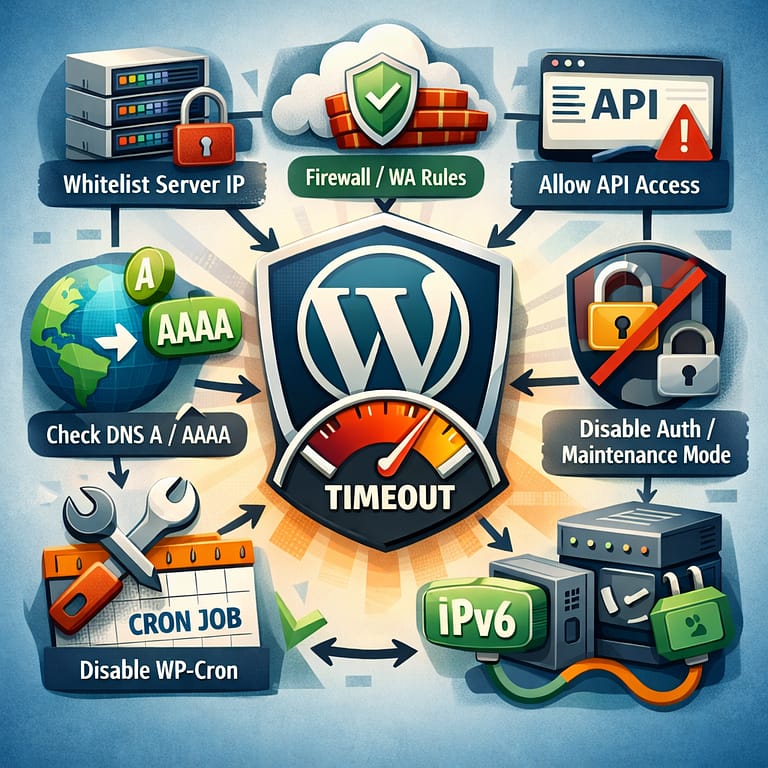
If your domain points to multiple A/AAAA records, ensure:
- A record points to the correct server IP
- AAAA record (IPv6) is valid or remove it if broken
A broken IPv6 route can cause “works sometimes” + mysterious timeouts.
Critical Error #2: “Your site could not complete a loopback request”
What it is (in human terms)
A loopback request is WordPress talking to… WordPress.
Like you calling your own phone to check your voicemail, and getting:
“This number cannot be reached because you are you.”
Loopbacks are used for:
- WP-Cron (scheduled tasks)
- plugin/theme editors’ safety checks
- background processing (some plugins rely on this heavily)
Your loopback error is the same 10-second timeout:
cURL error 28
Common causes
Most of the time, loopback failures happen because:
- Firewall blocks requests coming from the server to itself
- Basic Auth / password protection is enabled
(staging protection, maintenance password, “coming soon” pages) - Misconfigured redirects
http→https loops, www↔non-www loops, weird canonical redirects - Server cannot resolve its own domain
DNS problems from inside the hosting environment - Slow server
It tries to call itself, but the server is too busy to answer itself. Yes, it’s as sad as it sounds.
Fixes (do these in order)
1) Check for redirect loops
Use any redirect checker tool (or just test):
- http:// mysite.com
- https:// mysite.com
- https://www. mysite.com
Pick ONE canonical version and enforce it consistently in: - WordPress Address (URL)
- Site Address (URL)
- Cloudflare settings
- server config
2) Disable password protection / Basic Auth
If your site is behind Basic Auth, loopbacks often fail because WordPress doesn’t send credentials to itself.
If you must keep Basic Auth:
- configure exceptions for /wp-cron.php and /wp-json/
- or use a server-level cron instead of WP-Cron (more on that below)
3) Confirm WP-Cron isn’t being blocked
Some security rules block requests to wp-cron.php.
If loopback is broken, scheduled events won’t run reliably.
Best practice fix:
- Disable WP-Cron and set a real server cron job.
Add to wp-config.php:
define(‘DISABLE_WP_CRON’, true);
Then set a server cron to hit:
https:// mysite. com/wp-cron.php?doing_wp_cron
(Your host panel usually has a Cron Jobs section.)
4) Ask hosting to check outbound loopback connections
Sometimes hosts restrict loopback for security/performance reasons, or the server has networking issues resolving itself.
Tell support:
- Loopback requests time out after 10 seconds (cURL 28)
- REST API endpoint also times out
- Ask them to check local firewall rules, ModSecurity, and DNS resolution from the server
Why both errors appear together
Because they’re basically cousins.
Both involve WordPress making HTTP requests (either to its own REST endpoints or back to itself). When the server can’t respond fast enough—or blocks the request—both tests fail.
So you don’t really have “two separate problems.”
You have one underlying issue wearing two different hats.
The “Fix It Like a Pro” checklist
If you want a fast triage flow:
- ✅ /wp-json/ loads quickly in browser
- ✅ No security plugin is blocking REST / loopback
- ✅ No Basic Auth / password protection (or exceptions added)
- ✅ No redirect loops (http/https, www/non-www)
- ✅ DNS A/AAAA records correct (remove broken IPv6 if needed)
- ✅ Server resources are sufficient + caching enabled
- ✅ (Optional best practice) move scheduled tasks to real cron
Conclusion? WordPress isn’t broken, it’s just… overwhelmed
These “critical errors” sound like WordPress is about to explode.
Usually it’s just saying:
“I tried to call myself and got put on hold for 10 seconds.”
Relatable.
Code Companion GPT
Engaging code guide with humor and unique explanations.
If you want, paste:
- what you see when opening https:// mysite.com/wp-json/ (works/slow/error/403)
- whether you use Cloudflare + which security plugin(s)
- whether the site has Basic Auth or maintenance mode
…and I’ll tell you the most likely root cause and the shortest path to fix it.
Thank you for reading and sharing!

Invest in your future & learn
Learn affiliate marketing & build your own website.
Heads up! Make sure you sign up using my referral link to get access to all features.
👉 Sign Up